Fruits 3D Illustrations: A Versatile Asset for Designers and Creators
For designers, illustrators, and content creators, finding the right visual elements can make a significant difference in the quality and impact of their work. Fruits 3D Illustrations offer a unique and flexible solution for those seeking high-quality, editable, and visually appealing graphics. Whether you're working on web design, UI elements, presentation slides, or digital animations, these 3D renderings can add depth and realism without requiring advanced modeling skills.
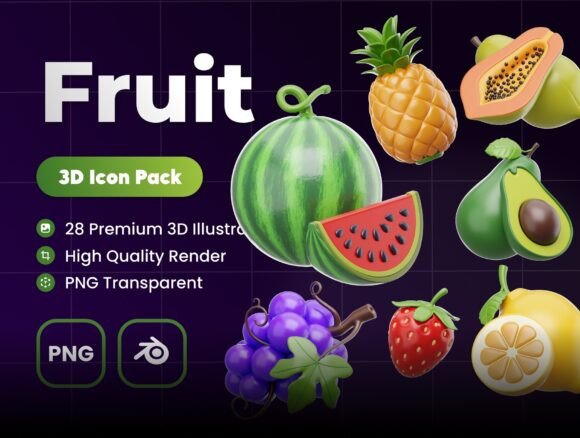
Each illustration in the Fruits 3D Illustrations collection is crafted with attention to detail, offering a realistic yet stylized representation of various fruits. The set includes 28 unique icons, each rendered at a high resolution of 3000 x 3000 pixels, ensuring clarity and scalability across different formats and screen sizes. These assets are not only visually striking but also practical, with editable objects and colors that allow for customization to match brand palettes or design themes.
What Makes Fruits 3D Illustrations Stand Out?
While there are many graphic resources available, Fruits 3D Illustrations distinguishes itself through its combination of quality, flexibility, and ease of use. Unlike flat icons or 2D vector graphics, these 3D renderings offer a more dynamic and dimensional look. This can be especially valuable when trying to convey realism, product detail, or visual interest in digital layouts.
One of the standout features is the ability to edit objects and colors within each illustration. This level of customization means that users aren’t limited to a fixed color scheme or composition. Whether you're designing a food-related app interface or a marketing poster for a health brand, you can tweak the visuals to align with your project’s aesthetic.
Additionally, the inclusion of Blender and PNG file formats ensures compatibility with a wide range of design software. For those who want to modify or animate the models further, the Blender files offer full access to the 3D objects. Meanwhile, the PNG versions provide an immediately usable format for those who prefer a plug-and-play approach.
Comparing 3D Illustrations with Other Graphic Formats
When evaluating visual assets, it's important to consider how 3D illustrations compare with alternatives like 2D vectors, stock photos, or custom illustrations. Each format has its strengths and limitations depending on the context and goals of the project.
- 2D Vector Graphics: Often used for icons and illustrations, vectors are scalable and file-friendly. However, they may lack the depth and realism that 3D renderings provide. Fruits 3D Illustrations can offer a more lifelike appearance, especially when showcasing textures and lighting effects.
- Stock Photography: Realistic fruit photos can be useful but may come with licensing restrictions and limited editing flexibility. With 3D illustrations, you get the realism without the constraints of real-world photography, allowing for easier color adjustments and background removal.
- Custom Illustrations: Commissioning original artwork offers full creative control but typically requires more time and budget. Fruits 3D Illustrations provide a cost-effective and time-efficient alternative that still maintains a high level of detail and quality.
Strengths and Limitations of Using 3D Fruit Illustrations
Like any design tool or resource, Fruits 3D Illustrations has its advantages and potential drawbacks. Understanding these can help you determine whether it’s the right fit for your specific needs.
Strengths:
- High Visual Impact: The 3D nature of these illustrations makes them stand out in presentations, websites, and print materials.
- Customization: Editable objects and colors allow for seamless integration into various design systems.
- Versatility: Suitable for UI design, animations, marketing materials, and more.
- Ready-to-Use: The included PNG files are easy to implement without requiring advanced 3D modeling knowledge.
Limitations:
- Learning Curve: While the PNG files are plug-and-play, working with Blender files may require some familiarity with 3D software.
- Niche Focus: This set is specifically designed for fruit-themed visuals, so it may not cover broader design needs beyond that category.
- File Size: High-resolution images can result in larger file sizes, which may impact website loading times if not optimized properly.
When Fruits 3D Illustrations Is the Right Choice
There are several scenarios where this collection would be particularly beneficial. If you're working on a project that requires a modern, visually engaging look and you don’t have the time or resources to create custom 3D models from scratch, this set offers a practical solution.
For example, a UI designer creating a nutrition app could use these illustrations to represent different food categories. A marketer designing a seasonal campaign for a juice brand could incorporate the visuals into social media graphics or email newsletters. Even educators preparing slides for a presentation on healthy eating could benefit from the clarity and appeal of these 3D renderings.
In cases where realism and visual richness are important but full-scale 3D modeling is impractical, Fruits 3D Illustrations provides a balanced alternative. It allows for professional-grade visuals without the overhead of creating or licensing complex 3D assets from scratch.
When You Might Consider Alternatives
Despite its strengths, Fruits 3D Illustrations may not be ideal for every project. If your design needs are minimal or you require a more abstract or minimalist aesthetic, flat icons or simple vector graphics might be more appropriate.
Similarly, if you're working on a project that requires highly specific or stylized visuals beyond the fruit theme—such as character illustrations or industrial product renders—this set won't meet those needs. In such cases, exploring broader 3D asset libraries or commissioning custom work could be a better fit.
Additionally, if your workflow doesn’t involve 3D tools and you’re looking for something even more plug-and-play than PNG files, you might prefer pre-designed templates or UI kits that integrate seamlessly into platforms like Figma or Sketch.
Practical Tips for Getting the Most Out of Fruits 3D Illustrations
To maximize the value of this resource, consider the following best practices:
- Optimize for Performance: If using these illustrations on a website, compress the PNG files to reduce load times without sacrificing quality.
- Consistency in Design: Use the editable color feature to ensure the illustrations match your brand’s color scheme and overall design language.
- Layer Thoughtfully: In animations or layered UI designs, treat these illustrations as focal elements rather than background components to maintain visual clarity.
- Combine with Other Assets: Mix and match with other graphic elements—like flat icons or abstract shapes—to create a balanced and cohesive design.
- Explore Blender Files: If you have access to 3D software or a team member who does, take advantage of the Blender files to animate or reposition the models for more dynamic applications.
Final Thoughts: Is Fruits 3D Illustrations Worth It?
Ultimately, the value of Fruits 3D Illustrations depends on your specific use case and design goals. For those seeking high-quality, customizable, and visually engaging fruit-themed graphics, this collection offers a compelling combination of features and usability. It bridges the gap between professional 3D modeling and accessible design tools, making it a strong contender for a wide range of creative projects.
If you're evaluating design assets and find yourself torn between 2D icons, stock photos, or custom illustrations, Fruits 3D Illustrations presents a middle ground that balances realism, flexibility, and ease of use. As with any creative resource, the key is to assess how well it aligns with your project’s visual tone, technical requirements, and timeline.